Dealer Response
Once an order is submitted, the dealership reviews the order and provides one of the following response:
If your looking for “Where can I find the response to my Order in Drift”, see My Deals.
If your looking for “How to Place an Order?”, see Order Journey.
Approved
If everything in the order is confirmed and dealership is ready to move forward, the dealership will mark the order as Approved:

In this case, to continue the purchase, see Finalize Purchase.
Canceled
If there is an issue in the order that cannot be mitigated, i.e. the asset you are trying to purchase is no longer available, the dealership will mark the order as Canceled:

In this case, the processing of the order can not longer continue.
The details of your canceled order will show up on My Deals - Canceled.
Trade-in Inspection
If the user offered a trade-in, the dealership — at its own discretion — may initiate a trade-in inspection. In this case the dealer will mark the order as Trade-in Inspection:

To confirm the the trade-in inspection date and address, see My Deals - Inspection.
Trade-in Accepted
After the trade-in inspection is complete, the dealer will mark the order as Trade-in Accepted.
Conditioned
If the terms specified by the user for the purchase are acceptable under certain conditions, the dealership will offer a very similar deal with slight changes. In this case the dealer will mark the order as Conditioned:
To review the Conditioned deal, and then to either accept or reject it, see My Deals - Conditioned.
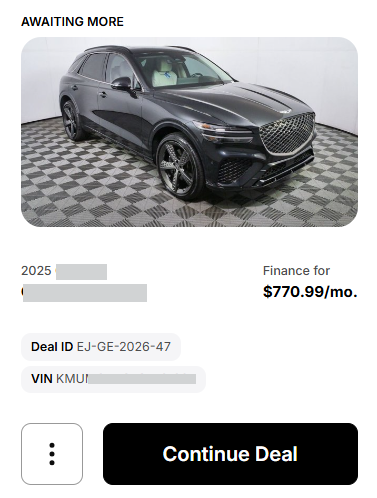
Awaiting More
If the vehicle selected is configured to be first be marked as Available by the dealer for the credit application to proceed, the Awaiting More status is displayed: